

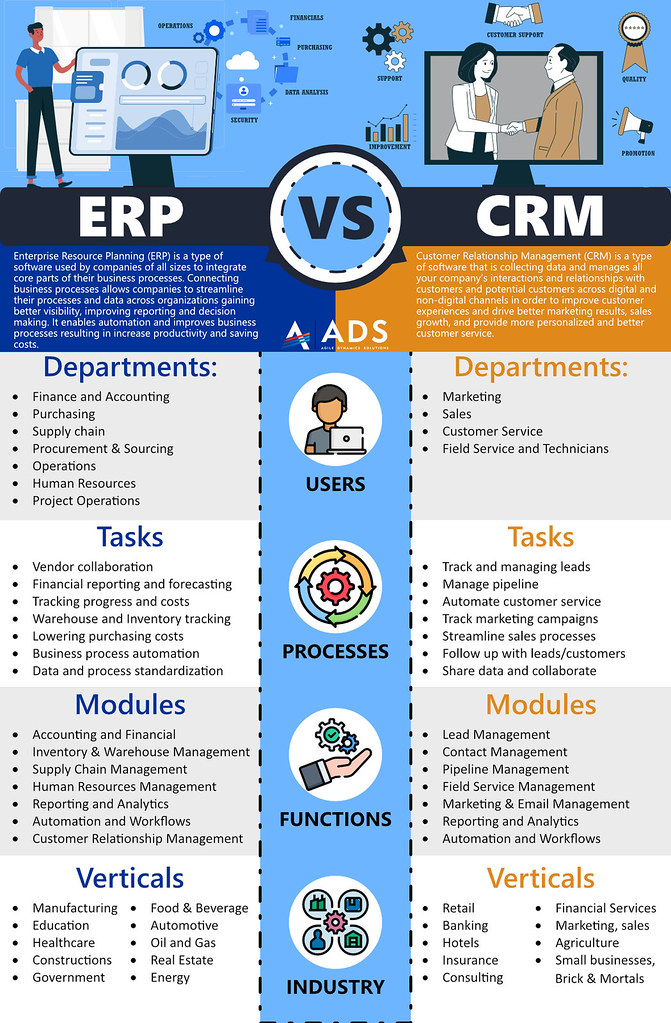
 Photo by adynamicssolutions via Flickr (CC BY 2.0)
An ERP (Enterprise Resource Planning) system is a structuring investment for any SME. Unlike standalone accounting software or a CRM, it covers all business processes — finance, procurement, inventory, production, HR and sales — within a single shared database. Choosing an ERP commits the organisation for five to ten years. A poorly calibrated system slows teams down and generates high maintenance costs; a well-chosen one streamlines operations and improves traceability at every level.
Why ERP selection is a long-term commitment for SMEs
Choosing an ERP is not simply a matter of picking the highest-rated solution on a comparison website. Each SME has its own processes, regulatory constraints and existing IT infrastructure. The ERP must adapt to these — not the other way round.
The three most common risks in ERP selection:
- Over-scoping: buying an ERP that is too comprehensive and will never be used beyond 40% of its capacity
- Underestimating integration costs: integration typically costs two to three times the price of the licences
- Neglecting adoption: a technically sound ERP that teams reject is bound to fail
For industrial SMEs, it is also worth consulting the ERP comparison for SMEs which details the most widely adopted solutions and their trade-offs.
Assessing business needs before approaching vendors
The preliminary work is the most critical phase. Before contacting a single vendor, the company must map its business processes and identify current pain points.
Key questions to ask internally:
- Which processes are currently poorly covered (manual re-keying, large spreadsheets, lack of traceability)?
- Which departments need access to the ERP (accounting, logistics, production, sales)?
- Which integrations are essential (e-commerce, CRM, payroll software, supplier EDI)?
- How many named users will there be? How many sites or entities?
This mapping directly determines the scope of functionality required and the budget. A distribution SME has very different needs from an industrial subcontractor.
The essential criteria for selecting an ERP
Once business needs are defined, evaluating solutions can begin against clear criteria. The table below summarises the eight criteria to weight according to your context:
| Criterion | What it covers | Importance |
|---|---|---|
| Functional coverage | Module fit to business processes | Very high |
| Total cost of ownership | Licences + integration + training + maintenance | Very high |
| Existing integrations | CRM, accounting, e-commerce, EDI | High |
| Scalability | Ability to grow with the business | High |
| Ergonomics and adoption | Ease of use, learning curve | Medium |
| Sector fit | Generalist vs sector-specific ERP | Medium |
| Similar customer references | Presence in your sector, comparable size | Medium |
| Vendor stability | Financial health, product roadmap, support | Medium |
The “functional coverage” criterion should be assessed against core processes — not against an exhaustive list of rarely used features. Vendors tend to highlight their full catalogue. The right ERP is one that covers your 80% of essential processes natively, without costly custom development.
Cloud ERP, SaaS or on-premise: which model for your SME?
The deployment model determines both the budget and IT governance.
SaaS (cloud-hosted) ERP: the vendor manages infrastructure, updates and security. The company pays a monthly subscription per user. Fast deployment (two to four months for an SME), automatic updates, accessible from any device. Downsides: dependence on internet connectivity, data stored with a third party (worth checking for GDPR compliance).
On-premise ERP: installed on the company’s own servers. Full data control, extensive customisation, no cloud vendor dependency. Trade-offs: infrastructure to maintain, higher upfront licence cost, updates to schedule internally.
Hybrid model: some vendors offer an intermediate model, with the core business layer on-premise and certain modules in SaaS (HR, expense management, BI). This model suits SMEs that want to keep sensitive data in-house while benefiting from cloud flexibility on specific functions.
For SMEs without an in-house IT team, SaaS is generally the safest path: it delegates technical management and allows you to start with a controlled budget.
Building an effective ERP requirements document
The ERP requirements document is the reference document that enables comparing offers on identical criteria and protects the company during negotiations.
Minimum structure of an ERP requirements document:
- Company context (business, headcount, revenue, number of sites)
- Expected functional scope by module (mandatory / desirable / optional)
- Required integrations (list of existing tools with versions)
- Technical constraints (existing infrastructure, hosting, security)
- Weighted selection criteria (scoring grid from 1 to 5 per criterion)
- Indicative budget and target timeline
A well-written requirements document significantly reduces the gap between what is shown in a demo and what is actually contracted. It also makes it possible to obtain comparable proposals from different vendors.
If the ERP includes a CRM module, it can be useful to compare its features with those of a dedicated tool: the best CRM software comparison details the alternatives for SMEs that prefer to keep their sales management independent.
The most common mistakes when choosing an ERP
Choosing on brand recognition rather than fit
SAP, Sage and Oracle are solid references, particularly suited to organisations with extensive needs. Odoo and Cegid are solutions well suited to smaller SMEs.
Underestimating the integration budget
Vendors quote licence prices, but integration costs (configuration, data migration, custom developments) typically represent 150 to 300% of licence costs. Always request a full quote covering “licences + integration + training + year-one maintenance”.
Neglecting change management
An ERP changes working habits across all departments. Projects that fail have almost always underestimated change management: insufficient training, lack of internal champions, too fast a rollout without a pilot phase.
Confusing ERP with satellite software
An ERP is not necessarily the best tool for every function. A dedicated inventory management software may outperform a generic ERP stock module. Similarly, standalone accounting software for small businesses may be sufficient for smaller structures that do not need the full power of an ERP.
Consider involving your chartered accountant in the decision, especially for the accounting module. Firms such as In Extenso know the reporting constraints the ERP will need to handle.
Frequently asked questions
How do you choose the right ERP system?
Choosing an ERP requires evaluating each solution against concrete criteria: coverage of business needs, integration with the existing IT landscape, total cost of ownership (licences, integration, training), ease of adoption by teams, and scalability over 5 to 10 years. Writing a requirements document beforehand is the best way to structure this evaluation.
What is the difference between cloud ERP and on-premise ERP?
A cloud ERP (SaaS) is hosted by the vendor, accessible online, with a monthly subscription and automatic updates. An on-premise ERP is installed on the company’s own servers, requires internal infrastructure and involves a high upfront licence cost. For SMEs, cloud generally offers faster deployment and a lower entry cost.
What are the 3 types of ERP?
There are three main types: the generalist ERP (covers all functions — finance, HR, sales, procurement, inventory), the sector-specific ERP (designed for a particular industry such as manufacturing, distribution or construction) and the open-source ERP (open codebase, highly customisable, with an active community such as Odoo). The right type depends on the industry and the required level of customisation.
What is the average cost of an ERP project for an SME?
An ERP project for an SME typically costs between €15,000 and €80,000 for the initial deployment, covering licences, integration and training. In SaaS mode, subscriptions start at around €25 per user per month. Annual maintenance generally represents 15 to 20% of licence costs. Return on investment materialises on average between 18 and 36 months.